Questions?
We have answers.
Search our documentation or browse categories below. Talk directly to the team that built the apps.
General
Core overview of Styld apps, Shopify integration, and merchant compatibility.
What is Styld?
Styld builds focused Shopify apps that help merchants work on specific growth goals, including increasing order value and creating stronger mobile shopping experiences.
Our apps currently include Styld Mobile App Builder and Styld Bundles, with more Shopify solutions planned.
What Shopify apps does Styld offer?
Styld currently offers:
- Mobile App Builder: Create a native iOS and Android app for your Shopify store.
- Product Bundles: Create fixed bundles, volume discounts, Buy X Get Y offers, and Mix & Match promotions.
You can explore each app to find the solution that fits your store.
Which Styld app is right for my store?
Start with the growth goal you want to work on. Choose Styld Bundles if you want to encourage customers to add more to each order. Choose Styld Mobile App Builder if you want to create a branded mobile shopping experience for your Shopify store.
Who can use Styld apps?
Styld apps are built for Shopify merchants of all sizes, from small stores to growing DTC brands and established ecommerce businesses.
Our apps can be used across industries including fashion, beauty, food, supplements, and general ecommerce.
Are Styld apps built specifically for Shopify?
Yes. Styld apps are built for Shopify merchants and are designed around Shopify stores, workflows and customer shopping experiences.
Do I need coding knowledge to use Styld apps?
Most standard setup does not require coding or a developer. If your store has a custom requirement, the Styld team can help you understand the available options.
For example, you can configure bundle offers or manage your mobile app’s content and layout without needing to edit code.
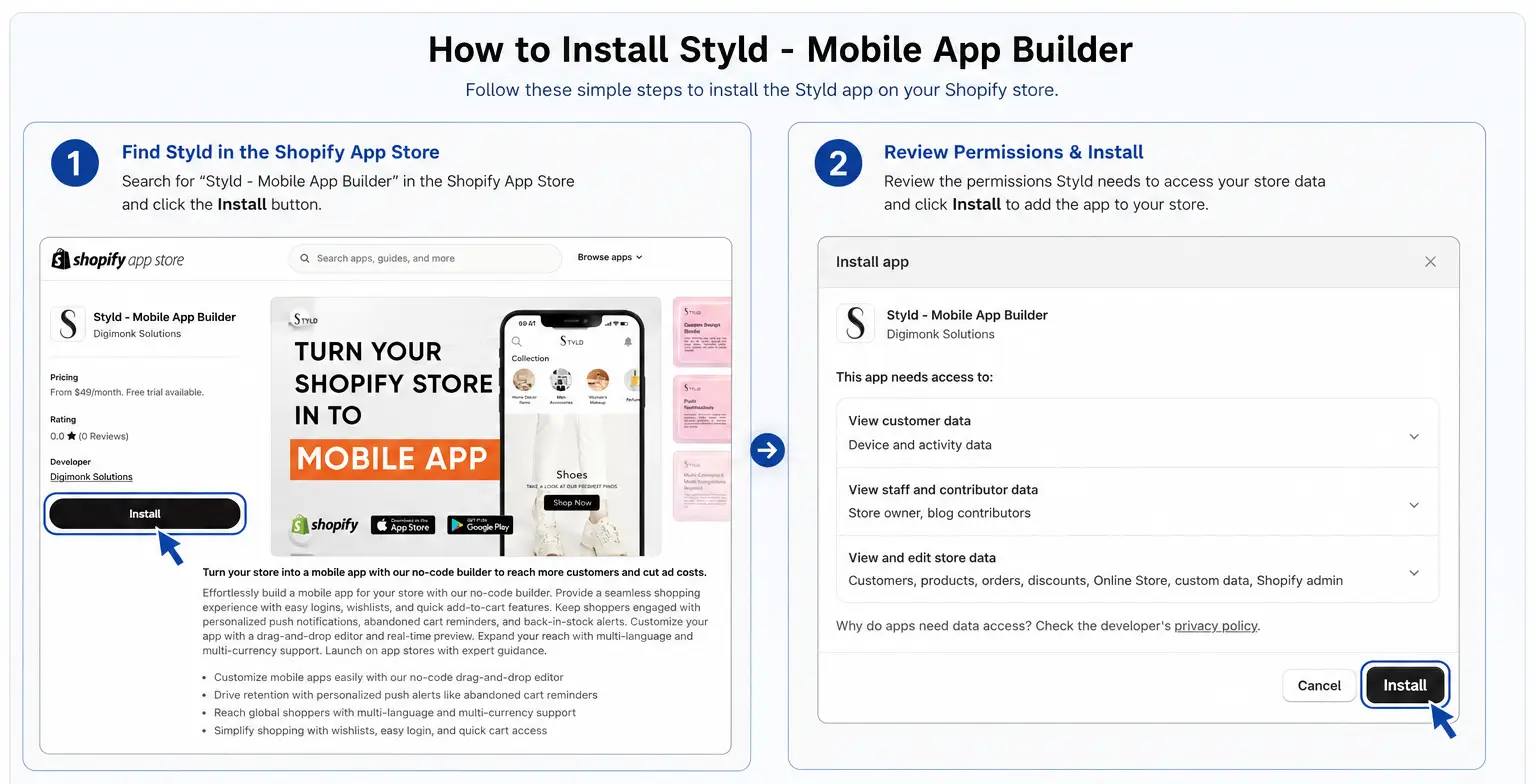
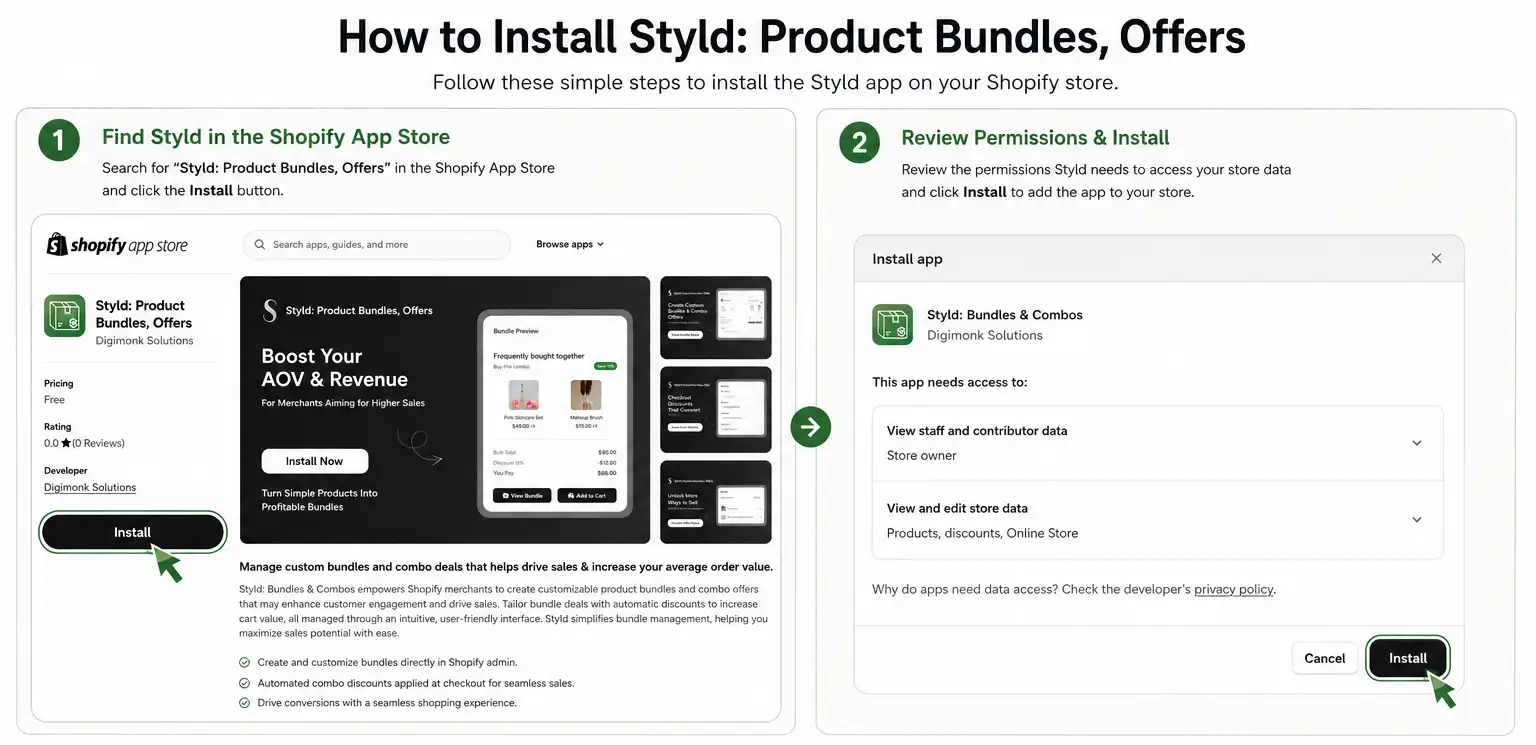
How do I install a Styld app?
You can install Styld apps directly through Shopify. Once installed, you can configure the app from its admin and connect it with your Shopify store.
Each app has its own setup process, and our support team can help if you need assistance.
- 1Open the Shopify App Store and search for the Styld app you need (e.g., Styld ‑ Mobile App Builder or Styld: Product Bundles, Offers).
- 2Click 'Install' to add the app to your Shopify store.
- 3Review and approve permissions in your Shopify Admin.
- 4Open the app dashboard to configure settings and connect your store.
Shopify Product Bundles FAQ
Product bundles, volume discounts, quantity breaks, BOGO, Buy X Get Y, Mix & Match, widget customization, inventory, and pricing.
What is a Shopify product bundle?
A Shopify product bundle combines two or more products into a single offer, making it easier for customers to buy related products together.
With Styld Bundles, you can create Fixed Bundles, Volume Discounts, Buy X Get Y offers, and Mix & Match bundles directly in your Shopify store.
What types of Shopify product bundles can I create with Styld Bundles?
Styld Bundles supports four main Shopify bundle types:
- Fixed Bundles: Create product sets, kits, combo deals, starter kits, gift sets, and complementary product bundles.
- Volume Discounts: Create tiered pricing, quantity breaks, and multi-buy offers.
- Buy X Get Y: Create BOGO offers and other qualifying-product promotions.
- Mix & Match: Let customers choose eligible products to build their own bundle, variety pack, or custom bundle.

Can I create Shopify Volume Discounts and quantity breaks?
Yes. Styld Bundles lets you create Volume Discounts and quantity breaks where customers receive a better offer when they purchase more.
For example, you can create offers such as:
- Buy 2 → 10% off
- Buy 3 → 15% off
- Buy 5 → 20% off
You can also create fixed-price quantity offers such as "Buy 3 for $40."
- 1In the Styld Bundles dashboard, click "Create bundle".
- 2Select "Volume Discount" as the bundle type.
- 3Select the products or collections, then set your discount type and quantity tiers.
- 4Review the storefront preview to confirm how the Volume Discount will appear to customers.
- 5Click "Save" at the top.


Can I create BOGO and Buy X Get Y offers on Shopify?
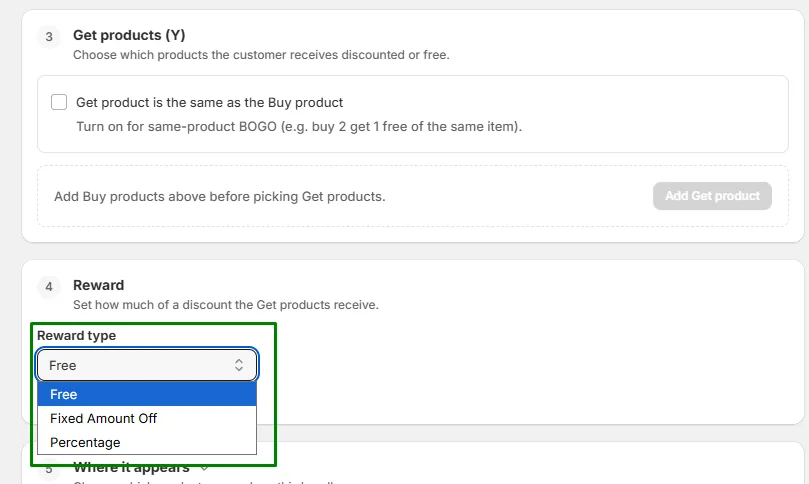
Yes. Styld Bundles supports Buy X Get Y offers, including BOGO promotions, Buy 2 Get 1 Free offers, free gifts, free samples, and percentage discounts on qualifying products.
Choose the products involved and configure the qualifying quantity and reward for your promotion.
- 1In the Styld Bundles dashboard, click "Create bundle".
- 2Select "Buy X Get Y" as the bundle type.
- 3Choose product X and set the qualifying quantity.
- 4Choose product Y and set the reward, such as Free or a percentage discount.
- 5Click "Save" to activate the offer.


Can I create Mix & Match bundles on Shopify?
Yes. Mix & Match lets customers choose from eligible products and build their own bundle.
For example, you can create an offer such as "Choose any 3 for $30" or let customers build their own box from a selected collection.
- 1In the Styld Bundles dashboard, click "Create bundle".
- 2Select "Mix & Match" as the bundle type.
- 3Choose the collection or products customers can select from.
- 4Set the bundle size rule, such as picking any 3 items, and choose the bundle price or discount.
- 5Click "Save" to activate.


Can I create fixed-price product bundles or percentage discounts?
Yes. Styld Bundles supports fixed-price bundles and percentage-based discounts across its bundle types.
For example, you can offer:
- 20% off when products are bundled
- Any 3 products for $30
- A complete bundle for a fixed price



Can I choose which products are eligible for a product bundle?
Yes. You can select the products and variants that are eligible for your bundle. Mix & Match bundles can also use products from collections.
You can exclude specific products or SKUs when configuring your offer.


Do I need to edit my Shopify theme code to add a bundle?
No. Styld Bundles uses Shopify's app embed functionality, so you can activate and display bundle widgets through the Theme Editor without manually editing your theme code.
- 1In the Styld Bundles dashboard, click "Activate" on the setup banner to open the Shopify Theme Editor.
- 2In the Theme Editor, click "Save" at the top-right corner to make the bundle widget live.


Can I customize the Shopify product bundle widget?
Yes. You can customize the bundle widget to match your store's design, including supported colors, fonts, buttons, and text.
You can also translate the bundle text for a localized shopping experience.
- 1In the Styld Bundles dashboard, click "Create bundle".
- 2Select your desired bundle type (Volume Discount, Buy X Get Y, Fixed Bundle, or Mix & Match).
- 3Switch to the "Design (optional)" tab, select "Customize" under Appearance, and configure your layout, colors, cards, and button styles.


Can I create multiple product bundles for my Shopify store?
Yes. You can create multiple product bundles and configure each offer independently.
This lets you use different bundle strategies across products, collections, and promotions.

What happens if a product in my bundle goes out of stock?
Your bundle keeps showing on your storefront, but its Add to cart and Buy it now buttons are replaced by a disabled Sold out button, so nobody can order something you can't ship.
Sold-out variants are marked Sold out in the variant picker, so customers can still choose one that's in stock. In a Mix & Match bundle, sold-out items can't be picked and customers choose from the rest.
Everything goes back to normal on its own once the product is back in stock.
Can customers purchase product bundles and individual products in the same store?
Yes. Customers can purchase bundles or continue purchasing individual products normally.
A bundle can be added directly to the cart, while individual products remain available for customers who prefer to buy products separately.
How much does Styld Bundles cost?
Styld Bundles offers a free plan and paid plans based on your monthly bundle sales:
- Free: Up to $1,000/month in bundle sales
- $7.99/month: Up to $2,500/month in bundle sales
- $19.99/month: Up to $5,500/month in bundle sales
- $39.99/month: Unlimited bundle sales
The plans are based on bundle sales, not on how many bundles you create. You can create multiple bundles within your plan.

Mobile App Builder
Native iOS & Android apps, real-time sync, visual layout drag-and-drop, and App Store publishing.
Can I turn my Shopify store into a mobile app?
Yes. Styld Mobile App Builder lets you turn your Shopify store into a native mobile shopping app for iOS and Android.
Your Shopify store remains connected to the app, so you don't need to maintain a separate product catalog for your mobile store.
Does Styld create native iOS and Android apps?
Yes. Styld creates native iOS and Android apps, giving your customers a mobile shopping experience designed specifically for mobile devices.
You can build an iOS app, an Android app, or both.
Do I need coding skills to create a Shopify mobile app?
No. Styld provides a merchant admin where you can manage your app's content, layout, and supported settings without editing code.
You can update your app as your store and marketing campaigns change.
Can I change my mobile app without publishing a new app version?
Yes. You don't need to submit a new App Store or Google Play version for every content or design change.
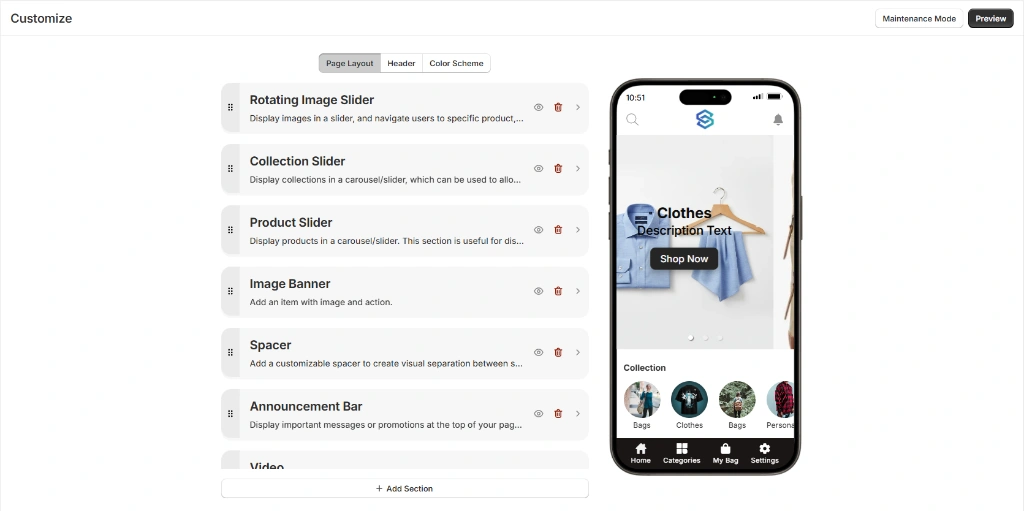
You can manage changes such as banners, layouts, sections, and other supported content directly from the Styld merchant admin.
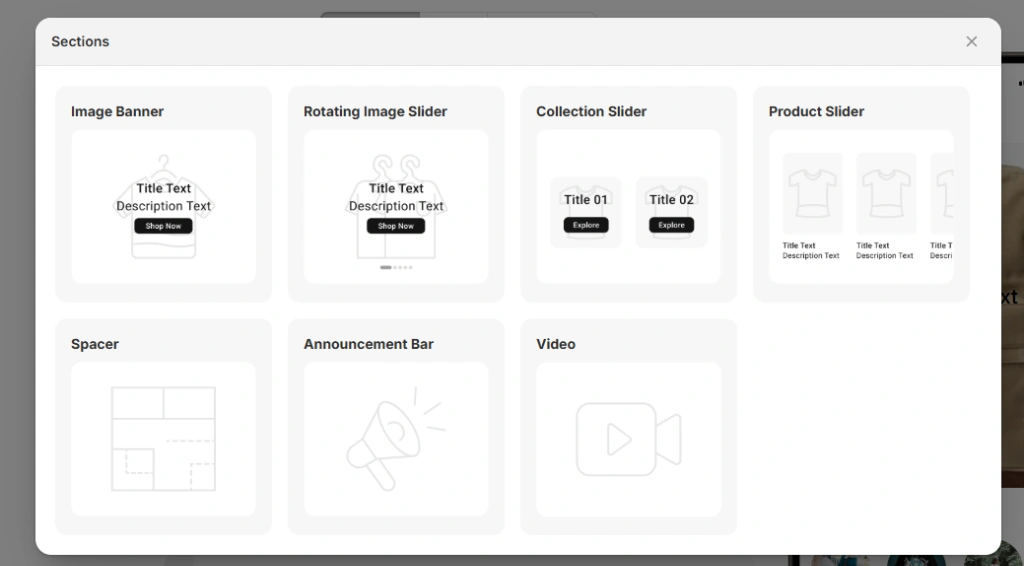
- 1Go to the Styld Mobile App Builder 'Customize' page and click '+ Add Section' at the bottom of the Page Layout tab.
- 2Select your desired section layout from the popup (e.g. Sliders, Banners, Announcement Bar) and configure its content.
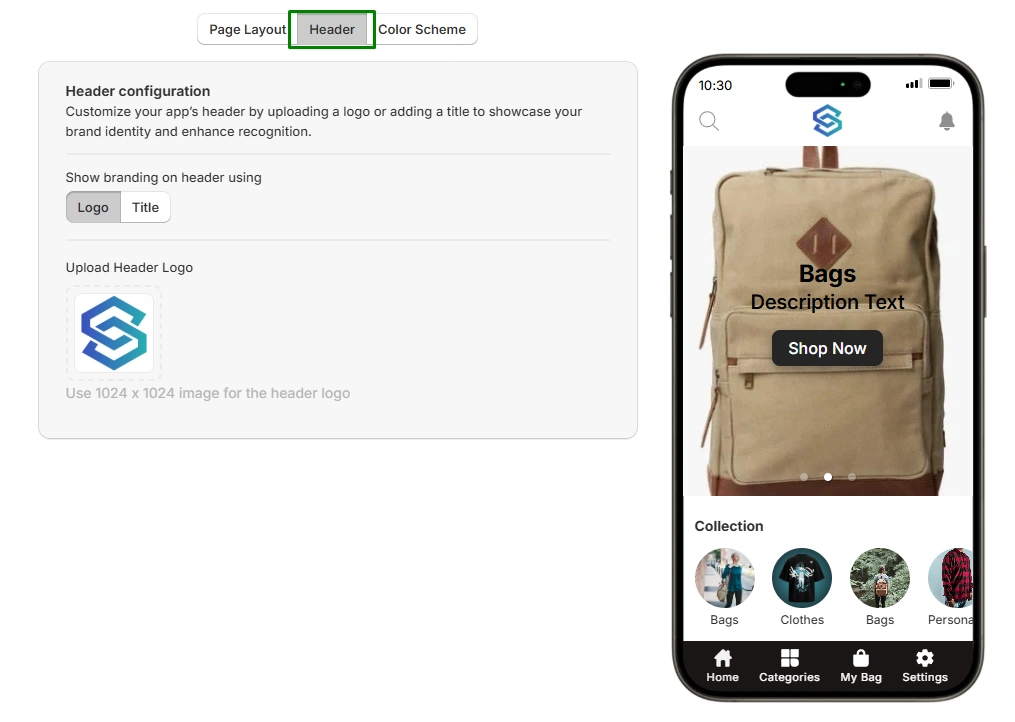
- 3Switch to the 'Header' tab to update your app logo and header branding title.
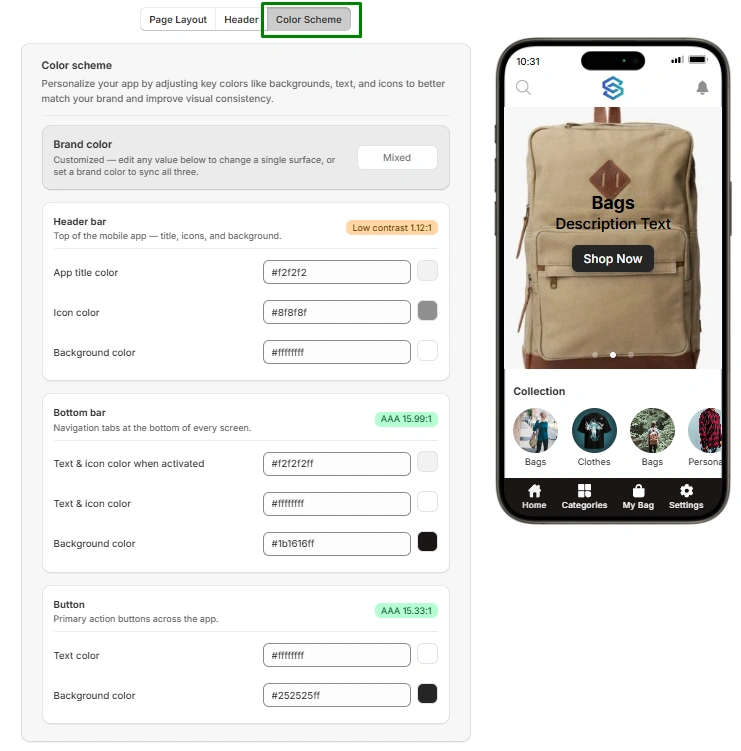
- 4Navigate to the 'Color Scheme' tab to customize header colors, navigation bars, and buttons to match your theme.
- 5Click 'Save' at the top, then reopen your Android or iOS app to see changes live instantly.

Does the mobile app sync with my Shopify store?
Yes. Styld connects your mobile app with your Shopify store and provides real-time synchronization.
Products, variants, prices, inventory, collections, customers, orders, and other supported Shopify data stay connected with your store.
Does Styld support product search, filters, and sorting?
Yes. Customers can search for products and use sorting options within the mobile app.
Product filtering is also available on the Growth plan.
Can I send push notifications to my Shopify customers?
Yes. Styld lets you send push notifications directly to customers who use your mobile app.
Depending on your plan, you can send a set number of notifications or use unlimited push notifications.
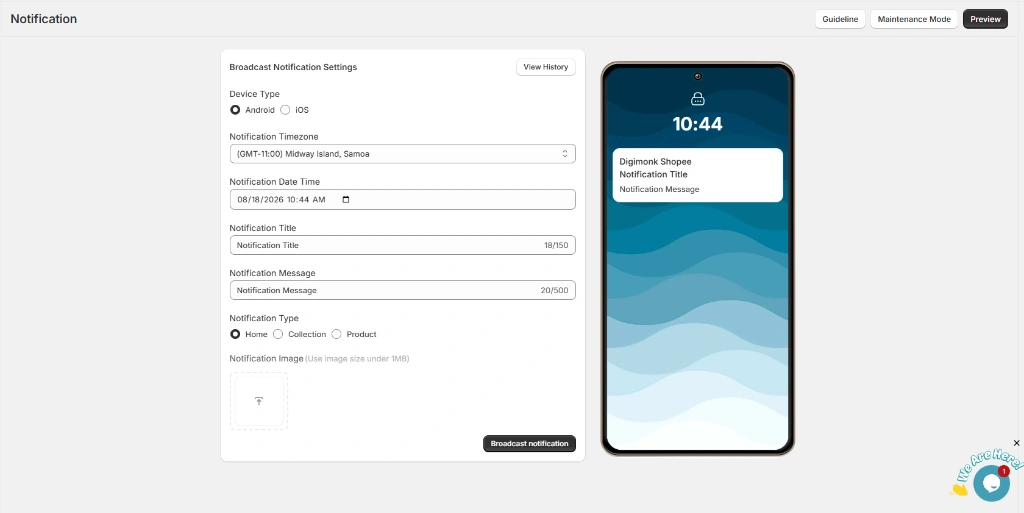
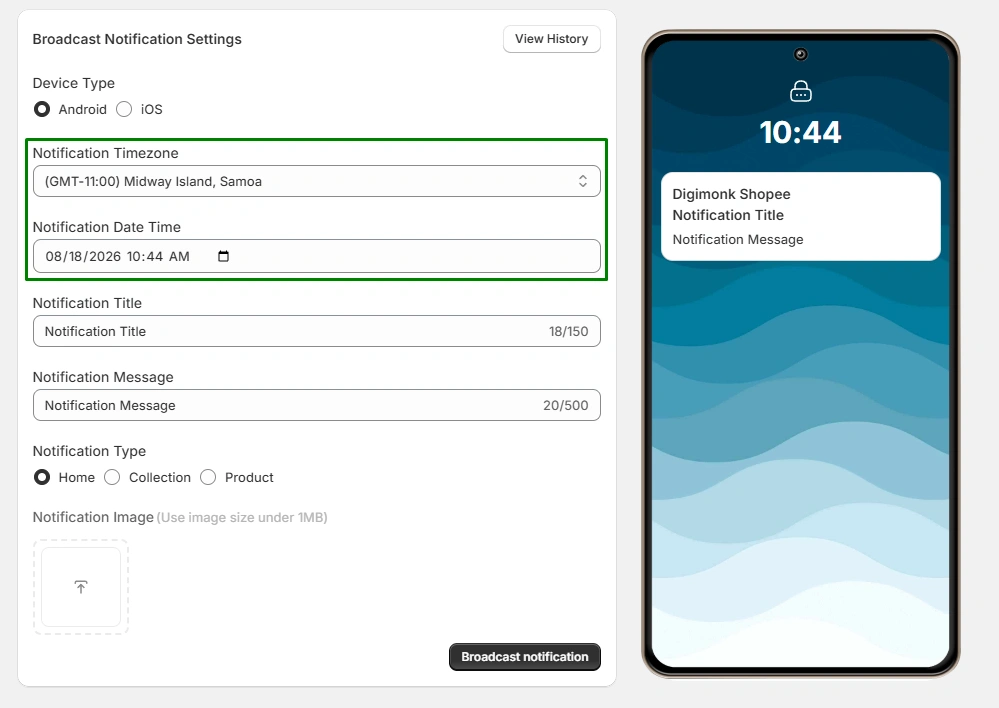
- 1In the Styld Mobile App admin, navigate to the 'Notification' page.
- 2Select your target Device Type (Android or iOS) and set your delivery timezone and date/time.
- 3Enter your Notification Title and Message, then choose your destination type (Home, Collection, or Product) with an optional image.
- 4Review the live lock screen preview on the right and click 'Broadcast notification'.
Can I schedule push notifications?
Yes. Scheduled push notifications are available on the Growth plan.
You can plan promotions, product launches, sales, and other campaigns and schedule notifications for a specific time.
Does Styld support abandoned cart push notifications?
Yes. Styld supports abandoned cart push automation, helping you remind customers about products they added to their cart but didn't purchase.
Does the mobile app support wishlists and customer accounts?
Yes. Styld supports customer accounts and wishlist functionality.
Customers can log in, manage their account, and save products for later.
Wishlist functionality is available on the Growth plan.
Does Styld support multiple currencies and languages?
Yes. Styld supports multiple currencies.
The mobile app currently supports English, French, German, and Dutch.
Does Styld publish my app to the Apple App Store and Google Play?
Yes. Styld manages the technical app publishing process for you.
We recommend that merchants use their own Apple Developer and Google Play Developer accounts and provide Styld with the required access. If you don't have your own developer accounts, Styld can also publish the app under its accounts where applicable.
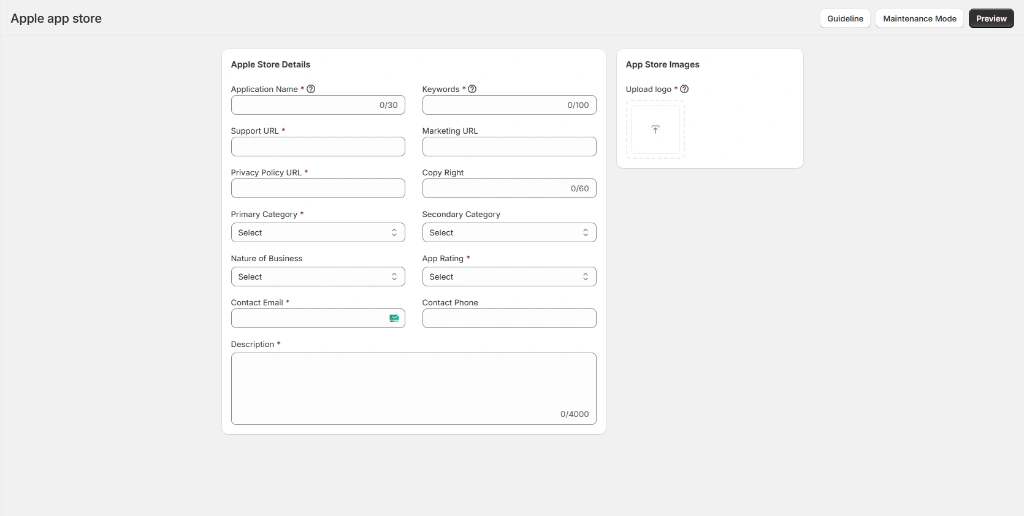
- 1In the Styld admin, navigate to the 'Apple app store' page to enter your app metadata, URLs, categories, description, and upload your app store logo.
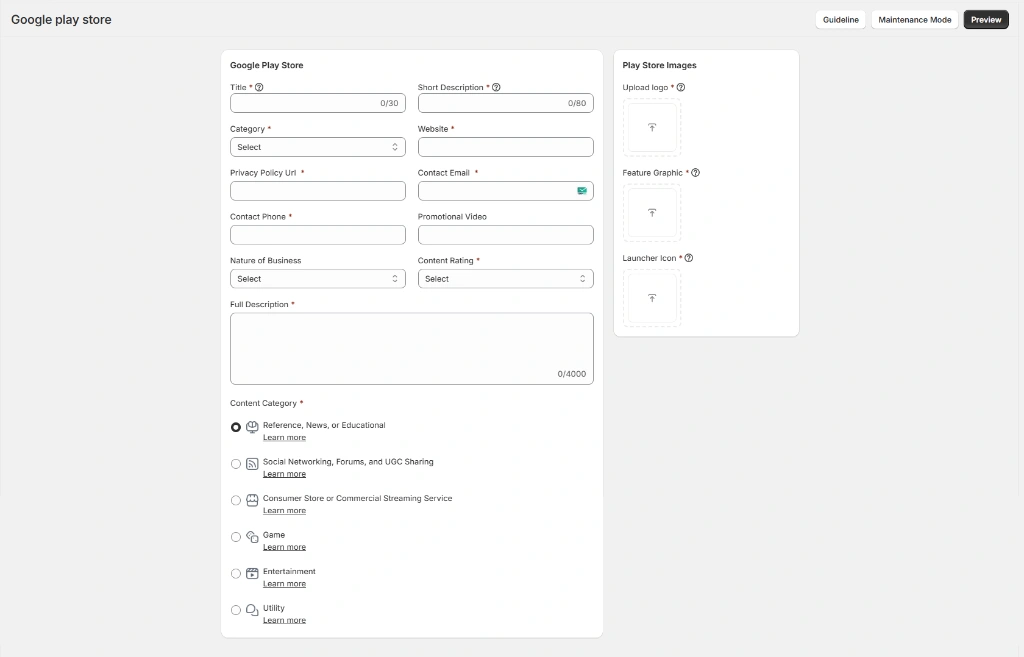
- 2Navigate to the 'Google play store' page to complete your store listing details, short & full descriptions, feature graphic, launcher icon, and content ratings.
How long does it take to publish my Shopify mobile app?
Once everything required from the merchant is ready, a typical launch can take around two weeks.
Final review time varies, because availability also depends on Apple and Google review times.
How much does Styld Mobile App Builder cost?
Styld Mobile App Builder has two plans:
- Native iOS and Android app
- Home page customization
- 30 push notifications
- Abandoned cart push automation
- Product search and sorting
- Live chat and email support
Everything in the $49/month plan, plus:
- Advanced reporting
- Unlimited push notifications
- Scheduled notifications
- Product filters & sorting
- Customer wishlists
- Third-party integrations
- Priority merchant support
Pricing & Billing
Subscription tiers, trial conditions, free plan allowances, and transaction fee transparency.
Where can I see pricing for Styld apps?
Current pricing and plan details are available on each Styld product page and the corresponding Shopify App Store listing.
Do Styld apps offer free trials or free plans?
Yes. Our pricing depends on the app.
Mobile App Builder offers a 14-day free trial. Product Bundles offers a free plan for up to $1,000 in bundle sales, with paid plans available as your bundle sales grow.
Check the individual product page for the latest pricing and plan details.
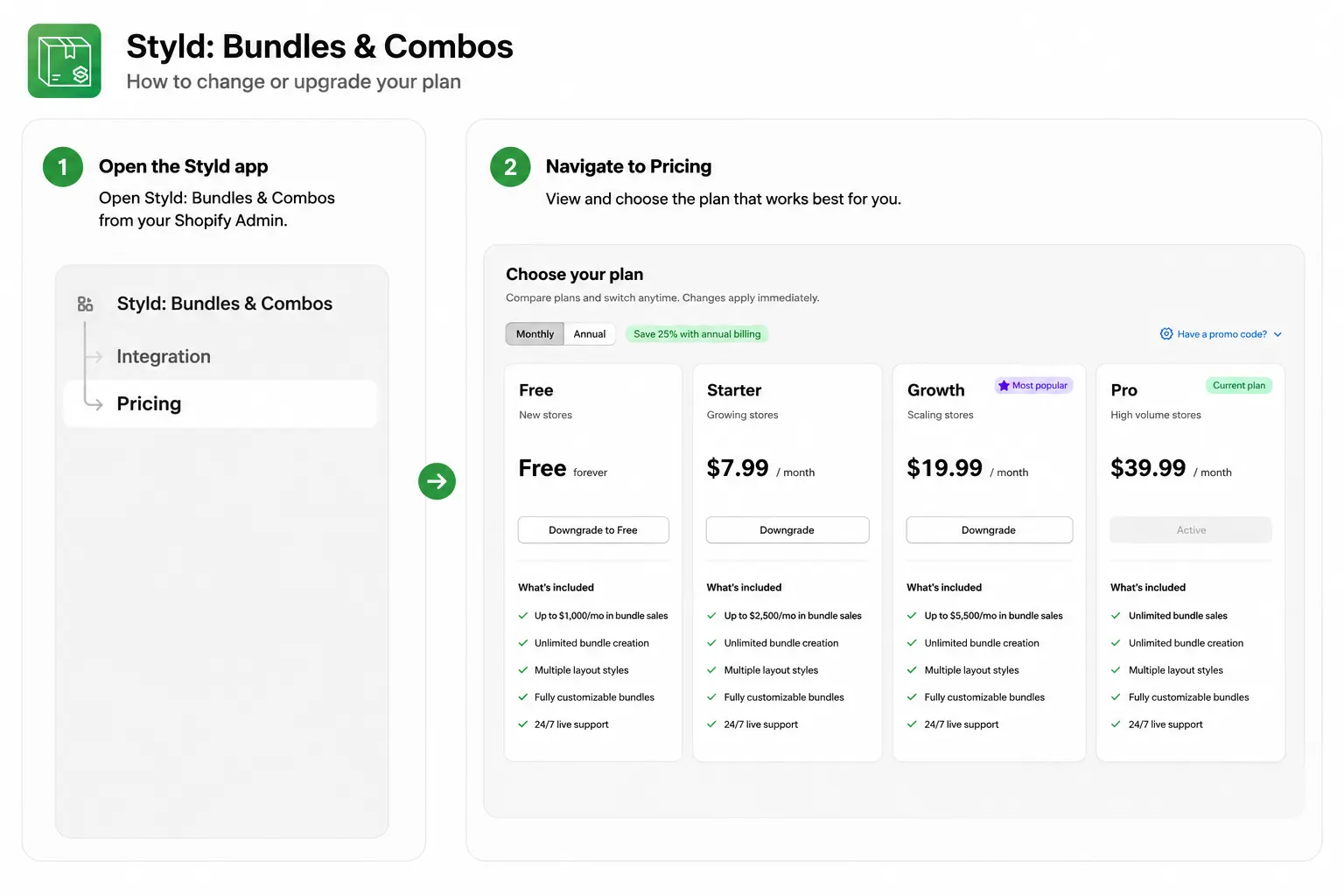
Can I upgrade or downgrade my plan?
Yes. You can change your Styld app plan as your store's needs change.
Your available plans and billing options depend on the specific Styld app you're using.
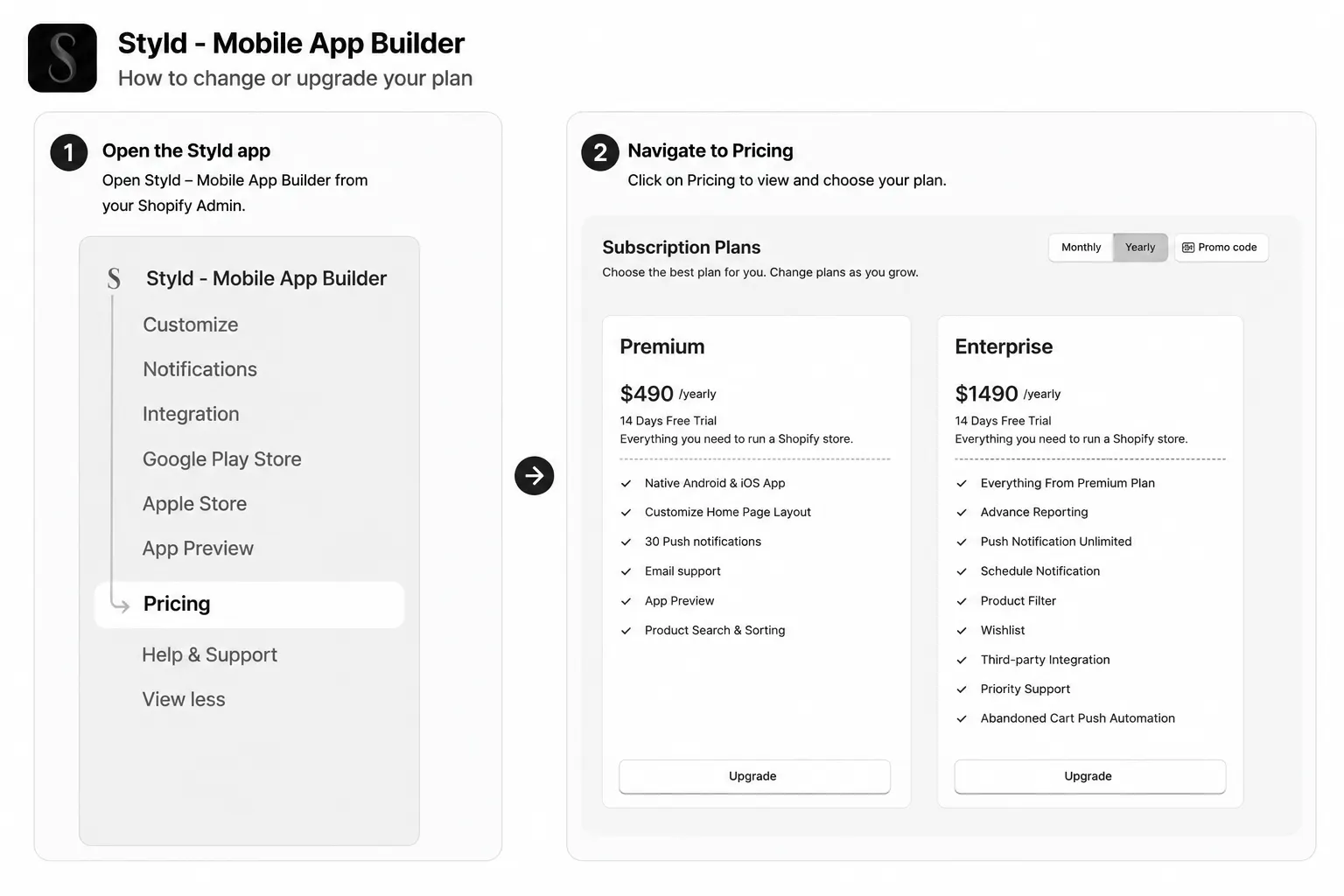
- 1Open the Styld app from your Shopify Admin.
- 2Navigate to Pricing.
- 3Select your desired plan and click "Upgrade" or "Downgrade."
- 4Approve the updated subscription in Shopify Billing.
Can I cancel my Styld subscription?
Yes. You can cancel your Styld app subscription according to Shopify's app subscription management process.
Your access and billing will be handled according to the applicable plan and Shopify's billing terms.
- 1Go to your Shopify Admin and click on 'Settings'.
- 2Select 'Apps and sales channels' from the sidebar.
- 3Find the Styld app in your installed apps list.
- 4Click 'Uninstall' or manage subscription settings directly.
Does Styld charge transaction fees?
Styld does not charge a separate transaction fee on orders processed through your Shopify store.
Some Styld apps use plan-based pricing or sales thresholds, so check the individual app's pricing page for details.
Setup & Support
App onboarding assistance, theme compatibility, and direct developer communication.
Do I get help setting up a Styld app?
Yes. Styld provides support to help merchants get started with our apps.
If you need help configuring an app, adding features, or resolving an issue, our support team can assist you.
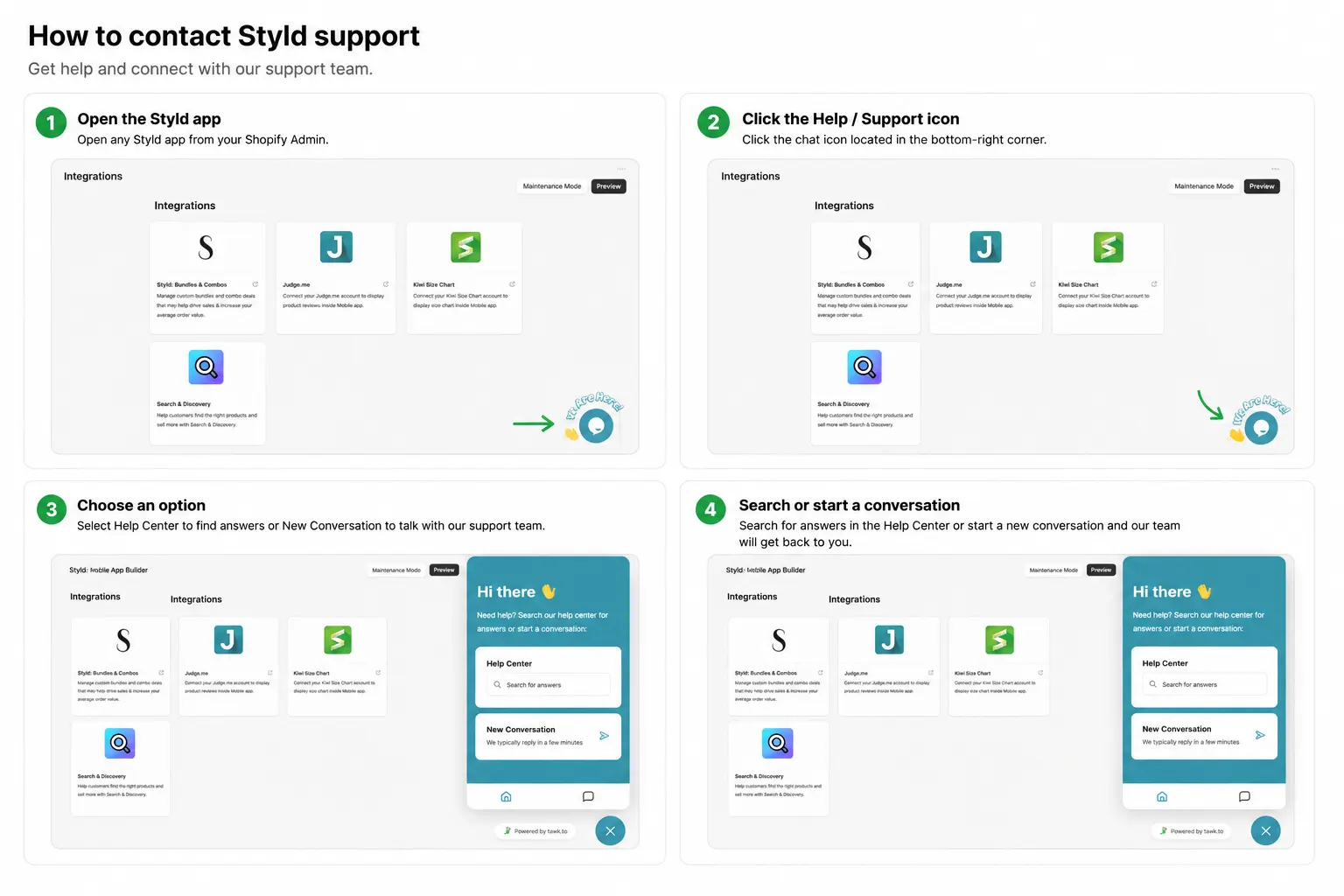
How can I contact Styld support?
You can contact the Styld support team through the support channels provided within the app or on our website.
Our team can help with setup, configuration, troubleshooting, and questions about using Styld apps.
- 1Open the Styld app dashboard in your Shopify Admin.
- 2Click the 'Support' or 'Help' icon located in the bottom-right corner.
- 3Choose live chat or submit a support ticket describing your question.
- 4Alternatively, visit the Contact page on our website to reach the team directly.
Can Styld help customize an app for my store?
Yes. If you need functionality or customization beyond the standard app features, you can contact the Styld team to discuss your requirements.
Depending on your needs, we may be able to provide a custom solution.
Are Styld apps compatible with Shopify themes?
Yes. Styld apps are designed to work with Shopify stores and use Shopify's supported integration methods.
For features that appear on your storefront, the specific installation method can vary by app and theme.
How do I get help with a Styld app?
You can contact the Styld team through our contact form or email us at {email}, or use the support options available for the specific app you are using.
Our support team can help you troubleshoot issues, understand app features, and configure your store.
Contact & Support
Response times, demos, onboarding, migrations, partnerships and feature requests.
How quickly do you usually respond?
Most messages get a reply within one business day. Technical support requests from existing merchants are usually faster.
Can I schedule a demo?
Yes. Select the app you're interested in on the form and mention you'd like a walkthrough, and we'll find a time that works.
Can agencies partner with Styld?
Yes, select "Partnership" in the form and tell us a bit about your agency or the merchants you work with.
Do you provide onboarding assistance?
Yes. Both Styld Mobile App Builder and Styld Bundles are designed to be set up from your Shopify admin, and our team can guide you through the setup for your store and theme.
Can I migrate from another app?
Migration options depend on the app you're moving from and what needs to be transferred. Tell us which app you're currently using, and we'll help you understand what the switch would involve.
Can I request a feature?
Absolutely. Select "General Question" in the form and tell us what you'd like to see. Feature requests go straight to the team that builds the apps.
Still have questions?
Talk directly to the founders. No canned responses or scripted replies. We'll help you choose the right solution for your store.