Styld Bundles · Shopify Product Bundles

Turn single-item carts
into bigger orders with product
bundles.

Create Shopify product bundles, Volume Discounts, Mix & Match, and Buy X Get Y offers with no code required.

Help customers discover complementary products, buy more quantities, or build their own bundle directly in your storefront.

No code requiredTheme-native widgetFree plan available

Built for Shopify merchants creating better bundle offers

Shopify Partner
Official Shopify App Store partner
4.9
Average merchant review rating
4-in-1
Bundles, Volume, Mix & Match, BOGO
Since 2018
Building Shopify apps for merchants
Increase average order value

Grow average order value with better product bundles.

Product bundles give customers a clear way to buy related products together. Combine complementary products, reward larger quantities, or let customers build a bundle that fits what they want while keeping the offer visible in your storefront.

4ways
Bundle types
Create Fixed Bundles, Volume Discounts, Mix & Match, and Buy X Get Y offers.
0code
Coding required
Build and publish bundle offers without editing your theme code.
1app
Bundle solution
Manage multiple bundle strategies from one Shopify bundle app.
Bundle types

One app, four ways to bundle.

Create Shopify bundle offers in the format that fits your products. Use Fixed Bundles, Volume Discounts, Mix & Match, and Buy X Get Y for different products and promotions.

Volume Discounts

Reward larger purchases

Create quantity breaks and tiered discounts that give customers a clear reason to add more products to their cart.

Example: Buy 3, save 20%
Best for: consumables, supplements, beauty products, and products customers buy in multiples.
Fixed Bundles

Create curated product sets

Combine complementary products into one offer with a clear bundle price and a simple purchase experience.

Example: Camera + lens + bag
Best for: starter kits, gift boxes, complete routines, and curated sets.
Mix & Match

Let customers build their own bundle

Let customers choose products from a collection while you control the minimum and maximum quantities.

Example: Pick any 4 from the collection
Best for: apparel, snacks, beauty products, and customizable packs.
Buy X Get Y (BOGO)

Reward customers with Buy X Get Y offers

Offer a discounted or free product when customers meet a purchase condition, such as Buy 2, Get 1 Free.

Example: Buy 2, get 1 free
Best for: promotions, product launches, seasonal offers, and loyalty campaigns.
See it in action

See Shopify product bundles in action.

See how Fixed Bundles, Mix & Match bundles, and Volume Discounts can appear directly in your Shopify storefront and fit naturally into your theme.

Fixed Bundles widget showing complementary products with a 10% bundle discount
Mix & Match widget letting customers choose products and receive a bundle discount
Volume Discounts widget showing quantity breaks and tiered savings
How it works

Create and publish product bundles in minutes.

No developer required. Choose a bundle type, configure your offer, customize the widget, and publish your first Shopify bundle offer in five simple steps.

STEP 01

Choose a bundle type

Choose the offer that fits your store: Fixed Bundles, Volume Discounts, Mix & Match, or Buy X Get Y (BOGO).

Styld Bundles screen for selecting a product bundle type
STEP 02

Select your products

Select the products for your bundle: individually, by collection, or using the options available in your store.

STEP 03

Set your offer

Set your bundle price, percentage discount, or quantity-based offer. Add the limits and conditions that fit your promotion.

STEP 04

Match your theme

Match the bundle widget to your storefront with your theme’s fonts, colors, and spacing, then fine-tune the design without code.

STEP 05

Publish & track

Publish your bundle and monitor its performance from one place, including bundle revenue, orders, and average order value.

Choose a bundle type
Styld Bundles screen for selecting a product bundle type
Styld Bundles screen for selecting products for a bundle
Styld Bundles screen for configuring bundle pricing and discounts
1Choose a template
2Pick an accent

Colors, corner radius, badges, and the cart button are all editable, with no theme code required.

Bundle & Save
Complete the set
Choose your packSAVE 20%
SingleStandard price
$40
Trio bundleYou save 20%
$96$120
Sample analytics
Bundle revenue$4,280
Bundle orders128
Average order value$57
Bundle examples

See how bundle offers can grow order value.

These illustrative examples show how fixed bundles, quantity offers, and complementary products can encourage customers to add more to an order.

Example · Skincare · Fixed bundle
3-step routine set
Separate
$34.00
Bundled
$57.80
Example · Apparel · Volume discount
Everyday tee, buy more save more
Single
$28.00
3-pack
$71.40
Example · Electronics · Cross-sell
Headphones + case + cable
Alone
$89.00
Bundled
$116.10
Why product bundles work

The buying psychology behind better bundles.

Product bundles can simplify the buying decision and make related products easier to evaluate together. Here are a few customer behaviors to keep in mind when creating your offers.

Reference pricing

Make the bundle feel like the smart choice

Show the individual value alongside the bundle price. Customers can understand the value of buying together without doing the math themselves.

Try this: show the original combined price beside the bundle price.
Relative value

Remove the “what else do I need?” moment

Curated bundles answer the next question before it's asked. Show complementary products together so customers can see the complete solution without searching for every item.

Try this: bundle products that naturally belong together.
Framed as a gain

Make the saving easy to understand

A clear offer is easier to understand than a discount hidden at checkout. Put the bundle saving or quantity benefit next to the purchase decision.

Try this: show the saving alongside the final bundle price.
Lower cognitive load

Make the next choice feel natural

Once a customer chooses one product, a relevant bundle can make the next choice easier. The key is relevance: offer products that genuinely complement the first purchase.

Try this: pair a core product with accessories or complementary products customers are likely to need.
Features

Everything you need to create better product bundles.

Create, customize, and manage Shopify product bundles, discounts, and bundle offers from one app.

Multiple bundle types

Create Fixed Bundles, Volume Discounts, Mix & Match bundles, and Buy X Get Y offers from one app.

  • Fixed Bundles & Mix & Match
  • Volume Discounts & Buy X Get Y

Smart discount rules

Set percentage discounts, fixed prices, or quantity-based offers and define the conditions for each bundle.

  • Tiered pricing by quantity
  • Per-customer & per-order limits

Customizable bundle widget

Display bundle offers in your Shopify storefront and customize supported styling to fit your theme.

  • Native storefront experience
  • Works with Online Store 2.0

Mobile optimized

Give mobile customers a clear, easy-to-use bundle experience on every screen size.

  • Responsive by default
  • Touch-friendly controls

Bundle analytics

Track bundle performance from one dashboard, including revenue, orders, and average order value.

  • Revenue per bundle
  • Average order value reporting

Inventory sync

Keep bundle availability aligned with live inventory across your products and variants.

  • Real-time stock checks
  • Helps prevent overselling

No-code editor

Build, preview, and publish bundle offers without editing your Shopify theme code.

  • Visual customization
  • Live preview before publishing

App compatibility

Designed to work alongside other apps used for discounts, loyalty, and subscriptions.

  • Works with discount & loyalty apps
  • Built with app compatibility in mind
Use cases

Product bundle ideas for different Shopify stores.

Different products call for different bundle strategies. Explore ways Shopify merchants can use product bundles, quantity offers, and Mix & Match combinations across common store categories.

Fashion & apparel

Build complete outfits from complementary products, or use Volume Discounts to encourage customers to buy more everyday wardrobe staples.

  • "Complete the look" outfit bundles
  • Multi-buy discounts on tees, socks, and basics
  • Seasonal capsule collections
Bundle idea: Shirt + trousers + shoes
Merchant Stories

Merchant feedback from stores using Styld Bundles.

See how Shopify merchants use Styld Bundles to create bundle offers and present them naturally in their storefront.

Styld Bundles
5.0Shopify App Store rating
Setting up product bundles was easier than I expected, and it looks great on the storefront. Our average order value has climbed steadily since day one.
Pricing

Simple pricing that grows with your bundle sales.

Start with the free plan and move to the next plan as your monthly bundle sales grow.

Free

New stores

Freeforever


  • Up to $1,000/mo in bundle sales
  • Unlimited bundle creation
  • Multiple layout styles
  • Fully customizable bundles
  • 24/7 live support
Install Styld Bundles
Starter

Growing stores

$7.99$5.99/month

$71.91 billed annually

Billed monthly, cancel anytime

  • Up to $2,500/mo in bundle sales
  • Unlimited bundle creation
  • Multiple layout styles
  • Fully customizable bundles
  • 24/7 live support
Choose Starter
Pro

High-volume stores

$39.99$29.99/month

$359.91 billed annually

Billed monthly, cancel anytime

  • Unlimited bundle sales
  • Unlimited bundle creation
  • Multiple layout styles
  • Fully customizable bundles
  • 24/7 live support
Choose Pro

No credit card required to start. Upgrade, downgrade, or cancel anytime from your Shopify admin.

FAQ

Shopify Product Bundles FAQ

Answers to common questions about product bundles, volume discounts, quantity breaks, Mix & Match, BOGO offers, pricing, and setup with Styld Bundles.

A Shopify product bundle combines two or more products into a single offer, making it easier for customers to buy related products together.

With Styld Bundles, you can create Fixed Bundles, Volume Discounts, Buy X Get Y offers, and Mix & Match bundles directly in your Shopify store.

Styld Bundles supports four main Shopify bundle types:

  • Fixed Bundles: Create product sets, kits, combo deals, starter kits, gift sets, and complementary product bundles.
  • Volume Discounts: Create tiered pricing, quantity breaks, and multi-buy offers.
  • Buy X Get Y: Create BOGO offers and other qualifying-product promotions.
  • Mix & Match: Let customers choose eligible products to build their own bundle, variety pack, or custom bundle.
Styld Bundles setup screenshot
Click to expand

Yes. Styld Bundles lets you create Volume Discounts and quantity breaks where customers receive a better offer when they purchase more.

For example, you can create offers such as:

  • Buy 2 → 10% off
  • Buy 3 → 15% off
  • Buy 5 → 20% off

You can also create fixed-price quantity offers such as "Buy 3 for $40."

Step-by-step walkthrough:
  1. 1
    In the Styld Bundles dashboard, click "Create bundle".
  2. 2
    Select "Volume Discount" as the bundle type.
  3. 3
    Select the products or collections, then set your discount type and quantity tiers.
  4. 4
    Review the storefront preview to confirm how the Volume Discount will appear to customers.
  5. 5
    Click "Save" at the top.
Step 1Styld Bundles setup screenshot
Click to expand
Step 2Styld Bundles setup screenshot
Click to expand
Step 3Styld Bundles setup screenshot
Click to expand
Step 4Styld Bundles setup screenshot
Click to expand
Step 5Styld Bundles setup screenshot
Click to expand

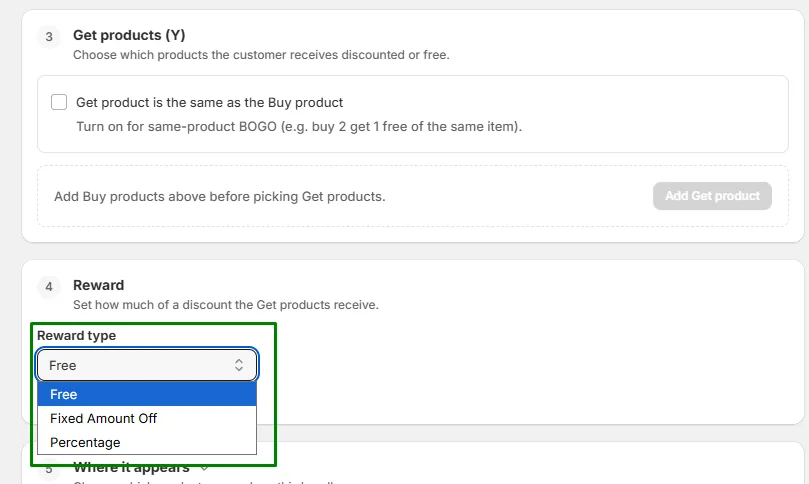
Yes. Styld Bundles supports Buy X Get Y offers, including BOGO promotions, Buy 2 Get 1 Free offers, free gifts, free samples, and percentage discounts on qualifying products.

Choose the products involved and configure the qualifying quantity and reward for your promotion.

Step-by-step walkthrough:
  1. 1
    In the Styld Bundles dashboard, click "Create bundle".
  2. 2
    Select "Buy X Get Y" as the bundle type.
  3. 3
    Choose product X and set the qualifying quantity.
  4. 4
    Choose product Y and set the reward, such as Free or a percentage discount.
  5. 5
    Click "Save" to activate the offer.
Step 1Styld Bundles setup screenshot
Click to expand
Step 2Styld Bundles setup screenshot
Click to expand
Step 3Styld Bundles setup screenshot
Click to expand
Step 4Styld Bundles setup screenshot
Click to expand
Step 5Styld Bundles setup screenshot
Click to expand

Yes. Mix & Match lets customers choose from eligible products and build their own bundle.

For example, you can create an offer such as "Choose any 3 for $30" or let customers build their own box from a selected collection.

Step-by-step walkthrough:
  1. 1
    In the Styld Bundles dashboard, click "Create bundle".
  2. 2
    Select "Mix & Match" as the bundle type.
  3. 3
    Choose the collection or products customers can select from.
  4. 4
    Set the bundle size rule, such as picking any 3 items, and choose the bundle price or discount.
  5. 5
    Click "Save" to activate.
Step 1Styld Bundles setup screenshot
Click to expand
Step 2Styld Bundles setup screenshot
Click to expand
Step 3Styld Bundles setup screenshot
Click to expand
Step 4Styld Bundles setup screenshot
Click to expand
Step 5Styld Bundles setup screenshot
Click to expand

Yes. Styld Bundles supports fixed-price bundles and percentage-based discounts across its bundle types.

For example, you can offer:

  • 20% off when products are bundled
  • Any 3 products for $30
  • A complete bundle for a fixed price
Fixed BundleStyld Bundles setup screenshot
Click to expand
Volume DiscountStyld Bundles setup screenshot
Click to expand
Buy X Get YStyld Bundles setup screenshot
Click to expand
Mix & MatchStyld Bundles setup screenshot
Click to expand

Yes. You can select the products and variants that are eligible for your bundle. Mix & Match bundles can also use products from collections.

You can exclude specific products or SKUs when configuring your offer.

Eligible ProductsStyld Bundles setup screenshot
Click to expand
Exclude ProductsStyld Bundles setup screenshot
Click to expand

No. Styld Bundles uses Shopify's app embed functionality, so you can activate and display bundle widgets through the Theme Editor without manually editing your theme code.

Step-by-step walkthrough:
  1. 1
    In the Styld Bundles dashboard, click "Activate" on the setup banner to open the Shopify Theme Editor.
  2. 2
    In the Theme Editor, click "Save" at the top-right corner to make the bundle widget live.
Step 1Styld Bundles setup screenshot
Click to expand
Step 2Styld Bundles setup screenshot
Click to expand

Yes. You can customize the bundle widget to match your store's design, including supported colors, fonts, buttons, and text.

You can also translate the bundle text for a localized shopping experience.

Step-by-step walkthrough:
  1. 1
    In the Styld Bundles dashboard, click "Create bundle".
  2. 2
    Select your desired bundle type (Volume Discount, Buy X Get Y, Fixed Bundle, or Mix & Match).
  3. 3
    Switch to the "Design (optional)" tab, select "Customize" under Appearance, and configure your layout, colors, cards, and button styles.
Step 1Styld Bundles setup screenshot
Click to expand
Step 2Styld Bundles setup screenshot
Click to expand
Step 3Styld Bundles setup screenshot
Click to expand

Yes. You can create multiple product bundles and configure each offer independently.

This lets you use different bundle strategies across products, collections, and promotions.

Styld Bundles setup screenshot
Click to expand

Your bundle keeps showing on your storefront, but its Add to cart and Buy it now buttons are replaced by a disabled Sold out button, so nobody can order something you can't ship.

Sold-out variants are marked Sold out in the variant picker, so customers can still choose one that's in stock. In a Mix & Match bundle, sold-out items can't be picked and customers choose from the rest.

Everything goes back to normal on its own once the product is back in stock.

Yes. Customers can purchase bundles or continue purchasing individual products normally.

A bundle can be added directly to the cart, while individual products remain available for customers who prefer to buy products separately.

Styld Bundles offers a free plan and paid plans based on your monthly bundle sales:

  • Free: Up to $1,000/month in bundle sales
  • $7.99/month: Up to $2,500/month in bundle sales
  • $19.99/month: Up to $5,500/month in bundle sales
  • $39.99/month: Unlimited bundle sales

The plans are based on bundle sales, not on how many bundles you create. You can create multiple bundles within your plan.

Styld Bundles setup screenshot
Click to expand
Ready to create better bundle offers?

Create product bundles that make it easier to buy more.

Install Styld Bundles to create product bundles, Volume Discounts, Mix & Match, and Buy X Get Y offers for your Shopify store. Need help choosing the right bundle strategy? Book a demo with our team.

Free plan availableNo code requiredCancel anytime